![64d9e16fc8e3963295162d90_logo.svg]](https://help.confidentlims.com/hubfs/64d9e16fc8e3963295162d90_logo.svg)
If your lab has been placing orders for non-cannabis/hemp samples under "Other" Category and "Other" Type, you can now update your menu settings to begin using the correct industry designation. This gives you proper categorization, cleaner reporting, and industry-specific test configurations. Existing orders under "Other" will remain as-is, and these changes will apply to all new orders going forward.
New Supported industries:
- Cannabis & Hemp
- Agriculture
- Food & Beverage
- Nutraceuticals
- Environmental
- More coming soon!
To Create or Update Current Non-Cannabis Test Packages
Labs can choose to either create entirely new test packages for new industries, or update current packages to be categorized under new industries. All existing packages, orders, and samples will remain as is and will be automatically categorized under the Cannabis & Hemp industry category. For more help on how to create or edit a test package, reference the article How do I Create or Edit a Test Package?
IMPORTANT NOTE: Whether you choose to create a new package or migrate your old packages, it is important that you reach out to support@confidentlims.com to let us know. This way, LIMS configurations and existing report templates can be migrated to the new and updated packages and matrix types accordingly.
- Navigate to Laboratory -> Settings -> Menu
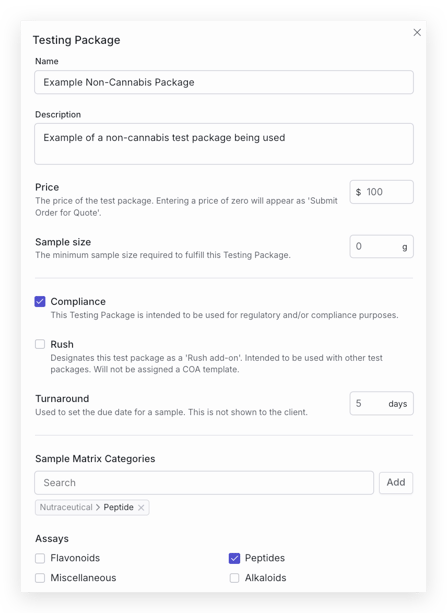
- Find the test package, and select Edit to edit the test package. Note that current test packages will already be under the Cannabis & Hemp industry category.
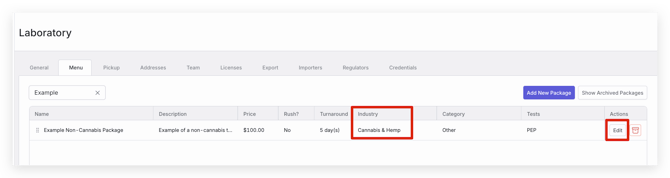
- Under Sample Matrix Categories, you can select the 'x' to remove the Cannabis & Hemp category for the package.
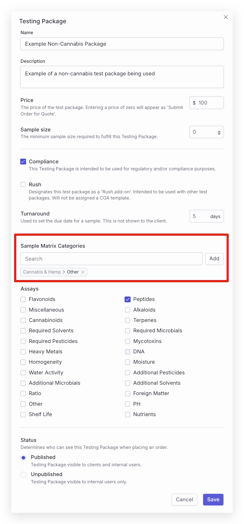
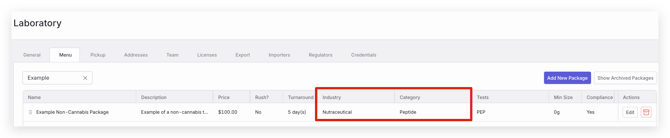
- In the Sample Matrix Categories search bar, you can now search and select the new matrix category and type for the package. For example the menu item in these screenshots previously had Cannabis & Hemp - Other selected for peptides testing. It was then updated to have the industry & category be Nutraceutical - Peptide.
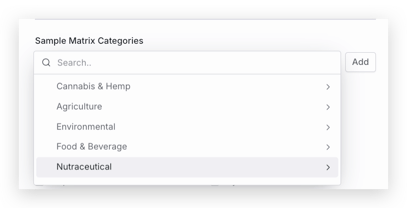
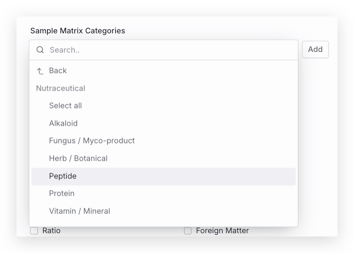
Note: Multiple Industries and categories can be selected for one test package!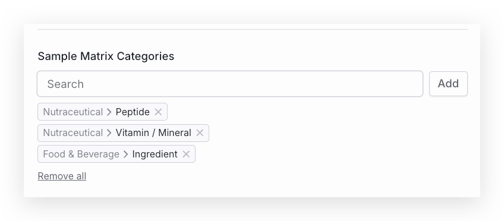
- Once you are finished updating the test package information, select Save. Your package will then be updated to the applied industries or matrix categories.
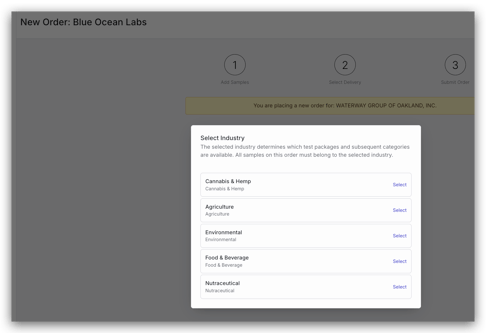
- Now, when placing orders, you will be able to select the applicable industry at the start of the order form. Only one industry category can be selected per order.
Updating the LIMS Configuration and Existing Report Templates
-
If you currently have specific configurations set up for the Cannabis & Hemp - Other category to support reporting in other industries, please reach out to support@confidentlims.com with instructions about which COA templates or LIMS configurations you want to use for the edited or new test packages (as usual).
-
LIMS configurations for assays, sample matrix categories, and types can now be configured per industry and specific matrix. Let our support team know if you would like to migrate any current LIMS configuration to new industry categories or matrices. Some existing aspects of the LIMS configuration may need to be migrated to the new matrix types being tested if you are currently using the Other category as a workaround.
- Existing non-cannabis report templates may be applied for specific test packages. If this is the case, please let our support team know which templates should be moved over or applied to new or edited test packages.
- If you are not sure how your configuration or report templates are currently set up, feel free to reach out to our support team and we can discuss your current set up!
Other Tips & Noteworthy Items
- Order Forms. Order placement and sample intake forms where you record sample details are now applicable to the industry selected when placing the order. For example, cannabis related fields and language will not appear for labs and clients when placing an order for non-cannabis industries. For cannabis and hemp orders, regulator integrations and fields remain as you have now.
- Industry column in table views. All major table views now include an Industry column. Filter, sort, and group your data by industry to keep your work organized.
- Updated Chain of Custody & Invoices. For Cannabis & Hemp samples, your current configurations and templates for these will remain the same. For new industries, we have configured new default templates, but please inform our support team (support@confidentlims.com) of any changes you may want to make to these templates.
- What if I don't see my industry or sample type? Let our support team know, or make suggestions to add industries or sample types using this CANNY board!
As always, please reach out to support@confidentlims.com if you have any questions or issues, we're here to help!